JavaScript Design Patterns Every Developer Should Know
Arjun chourasia
July 18, 2026
• 372 views
2026 Developer Fundamentals
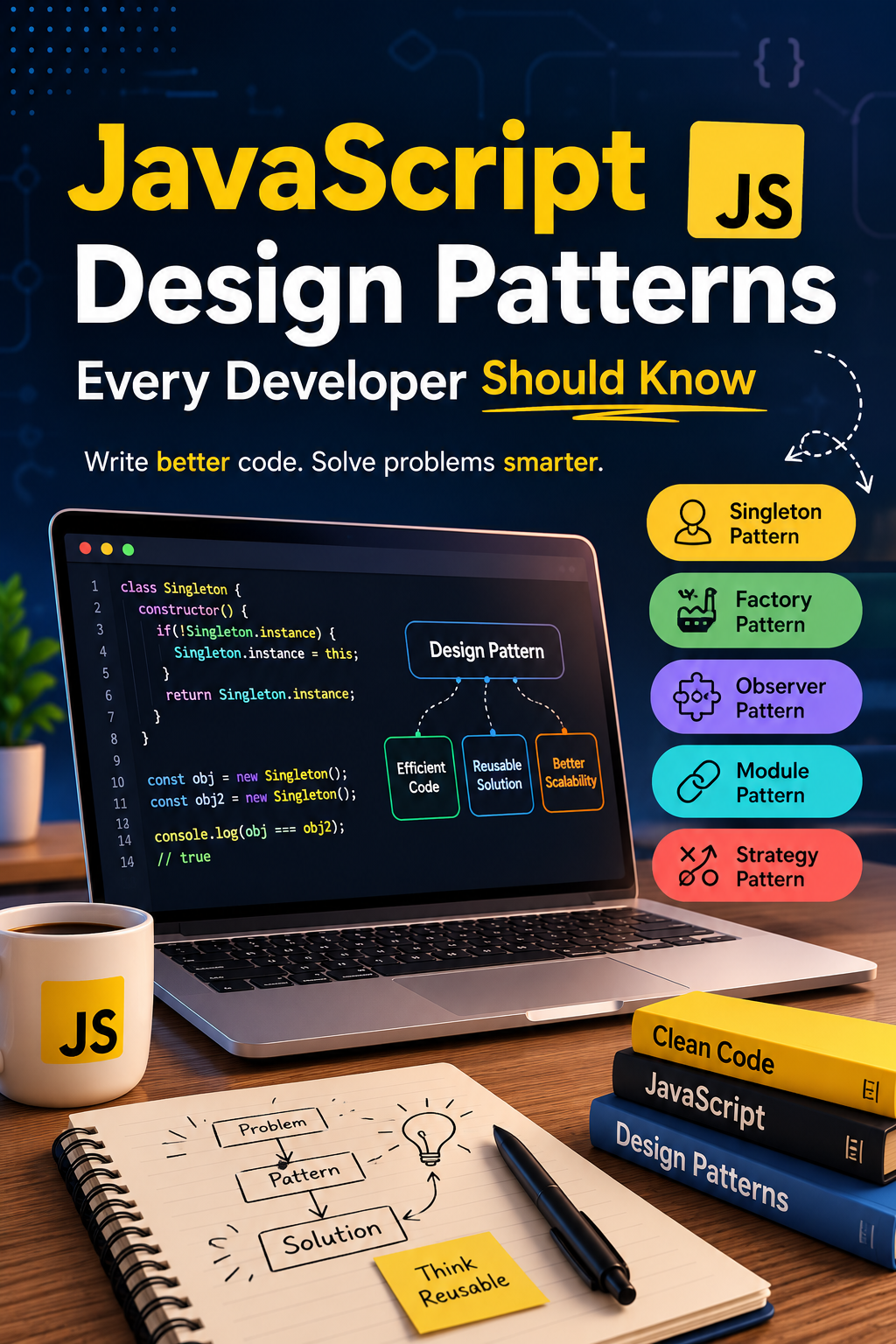
JavaScript Design Patterns Every Developer Should Know
Most developers have already used a Singleton, an Observer, or a Factory this week — they just didn't have the word for it. This guide names the patterns hiding inside code you already write, shows you where they show up in tools you already use, and gives you a way to talk about them clearly in a technical interview.
It usually starts small. One global variable holding shared state. One callback nested inside another callback. One function that grew a dozen responsibilities because splitting it felt like overkill at the time. None of it looks wrong in the moment — it's just code that works, written under a deadline.
The trouble shows up later, when a second developer opens that file and can't tell what depends on what. Design patterns exist because thousands of developers hit the exact same structural problems before you did, and gave the recurring solutions a name. Knowing those names doesn't make you a better typist — it makes you faster at recognizing which shape a problem already has, instead of inventing a shape from scratch every time.
Worth noticing: Modern front-end interview breakdowns increasingly carve out a specific slice for architecture and design-pattern questions — one 2026 interview-question bank put "React architecture and design patterns" at roughly 18% of a typical technical round. That's not a niche topic anymore; it's close to a fifth of the conversation.
"You Don't Need to Memorize Patterns. You Need to Recognize Them."
The most common mistake in learning design patterns: Treating them as a vocabulary quiz instead of a way of reading your own code differently.
You don't sit down and decide "today I will implement the Observer pattern." You notice that three different parts of your app need to react when the shopping cart changes, and you reach for a shape that already exists — one object that changes, several that listen. Give that shape a name, and suddenly you can search for it, discuss it in a code review, and recognize it instantly in someone else's codebase. That recognition speed is the actual skill.
3
Core pattern families
~20
Patterns worth actually knowing
1
Habit that makes them stick: naming them out loud
Quick Wins Before You Read Further
🧭 Sort by Category First
Every pattern falls into creational, structural, or behavioral. Learn the category before the individual pattern — it cuts memorization in a third.
🔍 Find One in Code You Already Wrote
You've almost certainly written a Factory or an Observer already. Naming it retroactively is the fastest way to make it stick.
🗣️ Practice the Plain-English Version
In an interview, "one object that changes, others that get notified" beats reciting a UML diagram every time.
Pattern Fluency Calculator
Could you explain these on a whiteboard, or only recognize the names? Move the sliders honestly.
Your Fluency Score:
32%
Name-Only
You recognize the vocabulary but haven't applied it deliberately yet. That's a normal starting point — the roadmap below closes this gap in a week.
The Uncomfortable Truth About "I Know Design Patterns"
"Naming twelve patterns from memory is worth less than explaining one you actually used and why."
Interviewers can tell the difference within thirty seconds. A candidate reciting a definition sounds like they read a list the night before. A candidate saying "I used a Factory here because I had four notification types that all needed slightly different shapes" sounds like someone who has actually shipped something. If you're building toward a role on RequireHire or documenting project work through Intern2Hub, that second version is the one worth having ready.
The Patterns Worth Actually Knowing
Pattern
Category
Solves
You've Probably Seen It In
Singleton
Creational
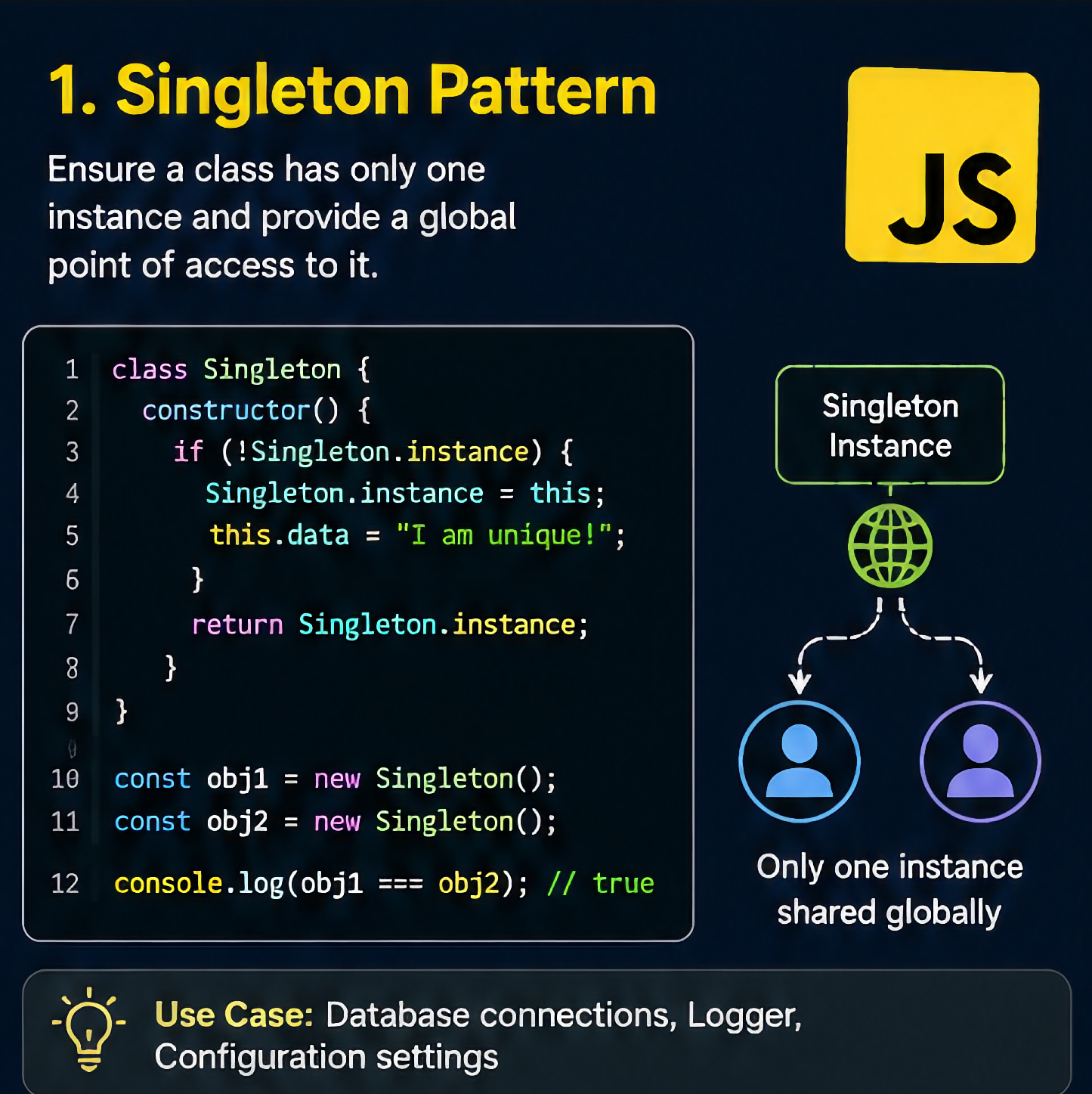
Exactly one shared instance of something
A single global store or config object
Factory
Creational
Creating similar objects without repeating setup logic
A function that builds different notification types
Builder
Creational
Constructing a complex object step by step
Chained query builders and config assemblers
Module
Structural
Hiding internal details behind a clean interface
Every ES module you've ever imported
Decorator
Structural
Adding behavior without changing the original function
Express/Koa middleware, higher-order functions
Facade
Structural
Simplifying a messy or complex API
A wrapper around fetch with built-in error handling
Notifying many parts of a system when one thing changes
addEventListener, pub-sub, state subscriptions
Strategy
Behavioral
Swapping an algorithm at runtime
Different sort/validation functions passed as arguments
Custom Hook (modern React-specific)
Behavioral
Reusing stateful logic without wrapper components
Nearly every modern React codebase
None of these are exclusive to class-based, textbook object-oriented programming. JavaScript's closures, first-class functions, and native Proxy object mean most of these patterns show up just as naturally in plain functional code as they do in a class hierarchy — the shape matters more than the syntax you use to build it.
It's also worth being honest about what's changed. Higher-Order Components and Render Props, once the default way to share logic in React, have been largely replaced by custom hooks for most everyday use cases — a shift widely noted across 2026 React guides. The underlying behavioral pattern (reusable, composable logic) didn't disappear; it just found a cleaner syntax to live in.
TypeScript adoption has also changed how a few of these patterns get written day to day. A Factory function's return type can now be declared explicitly, so a reviewer sees at a glance every shape it's allowed to produce. A Strategy pattern implemented as a typed interface catches a missing case at compile time instead of at runtime, weeks after the code shipped. None of this changes what the pattern is — it just makes the shape harder to get subtly wrong.
Three Families of Patterns You'll Actually Use
Every classic design pattern answers one of three questions: how do I create something, how do I structure something, or how do I coordinate behavior between things. Sorting a new pattern into one of these three families before memorizing its details cuts the mental load dramatically — you're not learning twenty unrelated tricks, you're learning three questions and a handful of answers to each.
Most real features touch all three families at once: a Factory creates an object (creational), that object is exposed through a clean Module boundary (structural), and it notifies listeners through an Observer when its state changes (behavioral).
The classic patterns in this guide come from decades of established software-engineering practice, not a repackaged summary of any single book or course. Every code sample was written from scratch for this piece — short, original, and meant to be read in ten seconds, not copied wholesale into a production app. Where a pattern's name or category is referenced, it follows the widely accepted creational, structural, and behavioral taxonomy used across software-engineering education generally, rather than any one author's specific wording or examples.
Grounded In:
✅ Established creational / structural / behavioral taxonomy
✅ 2026 front-end interview structure and question breakdowns
✅ Modern JavaScript language features (ES modules, native Proxy, closures)
The Pattern Recognition Loop
Skipping straight to Apply without Recognize is how patterns get forced onto problems that didn't need them. Skipping Explain is how they stay theoretical instead of interview-ready. The loop only builds real fluency when all four steps happen, in order, on code you actually wrote.
Your 7-Day Pattern Fluency Roadmap
Day 1–2: Learn the Three Families
Don't start with individual pattern names. Start with creational vs. structural vs. behavioral, and practice sorting patterns you already know into the right bucket.
Day 3–4: Find One in Your Own Code
Open an old project. Somewhere in it is an ad-hoc Singleton, Factory, or Observer you built without naming it. Find it and label it.
Day 5: Refactor One Thing on Purpose
Pick one messy function and rewrite it using a pattern deliberately — a Strategy instead of a chain of if/else, a Facade instead of scattered fetch calls.
Day 6–7: Practice the Explanation
Say the pattern out loud in plain English to another person, or record yourself. Then document the refactor as proof a reviewer through Intern2Hub can actually evaluate.
"But Is This Actually For Me?"
"Isn't this just old OOP theory? I write functional JS."
Most classic patterns translate directly into closures and higher-order functions. A Decorator is just a function that wraps another function. A Module is just a closure with a public interface. The shapes are language-agnostic; only the syntax changes.
"Won't this be overengineering for a small project?"
Sometimes, yes — and knowing that is part of the skill. A Singleton for a two-page site is unnecessary ceremony. Restraint, not pattern count, is what separates a senior developer's code from an over-architected mess.
"Do interviewers actually ask about this, or is it theoretical?"
Current front-end interview breakdowns increasingly bucket "architecture and design patterns" as its own scored category rather than folding it into general JavaScript questions — which means vague familiarity is a weaker answer than it used to be.
Curiosity
How many patterns are already hiding in your last project?
Most developers find at least three they built by instinct and never named.
One entry point, several possible shapes out — useful whenever "create a thing" has more than one valid outcome.
function notify(type, msg) {
  const base = { msg, ts: Date.now() };
  if (type === 'error')
    return { ...base, icon: '⛔' };
  if (type === 'success')
    return { ...base, icon: '✅' };
  return { ...base, icon: 'ℹ️' };
}
Where You've Already Used These Without Naming Them
If You've Ever Written an Event Listener
Every addEventListener call is a small Observer relationship — one DOM element as the subject, your callback as the observer. Custom pub-sub buses and most state-management libraries are the same idea scaled up to an entire application.
If You've Ever Wrapped a Component in Middleware
Express and Koa middleware chains, and React higher-order components before hooks took over, are both textbook Decorators — wrapping something to add behavior without touching its original definition or forcing every caller to know about the wrapper.
If You've Ever Wrapped fetch in a Helper
A small utility that hides retries, headers, and error parsing behind one simple call — apiGet('/users') instead of five lines of boilerplate every time — is a Facade. It exists purely to make a messy API pleasant to use.
Why Proof Beats Promises With Recruiters
"I know design patterns" is a sentence every candidate can say, and interviewers hear it constantly enough to discount it on its own. What actually moves a conversation forward is a specific example: which pattern, which problem, which tradeoff you weighed before choosing it.
This is exactly the gap that project-based hiring is designed to close. A short, documented refactor — showing the "before" code, the pattern you applied, and why — gives a reviewer something concrete to evaluate instead of a self-reported skill. It's a small artifact, but it does more work in an interview than an entire page of buzzwords.
Clarity
Refactor one real project, get it reviewed.
An Intern2Hub internship gives you a real brief and a reviewer who can tell you if your pattern choice actually made the code better.
Same features, same deadline. The difference shows up six months later, when someone else has to change it.
Where RequireHire Fits Into This
"Familiar with design patterns" appears on a large share of fresher resumes and tells a recruiter almost nothing on its own. On RequireHire, the goal is to connect that claim to something concrete — a documented refactor completed through Intern2Hub that shows which pattern you chose, on real code, and why.
That doesn't guarantee an offer. It does mean the conversation starts from your actual work instead of a checklist of buzzwords.
"You've heard the word 'Singleton' in at least eleven interviews. You still couldn't define it out loud right now."
Recognizing a word and being able to explain it under pressure are different skills, and interviewers know exactly how to tell them apart. The gap closes with one honest afternoon of practice, not another bookmarked article.
Where These Patterns Show Up in Tools You Already Use
Observer
Powers addEventListener and most state-management libraries
Decorator
Behind every Express/Koa middleware chain
Proxy
Built directly into JavaScript as a native object type
Compound Component
The pattern behind accessible component libraries like Radix UI and Headless UI
Custom Hook
Has replaced HOCs and render props for most modern React use cases
~18%
of one 2026 front-end interview bank scored on architecture and design patterns
Could your team name the patterns in your own codebase?
Share your fluency score and find out who's been writing a Factory pattern for two years without knowing its name.
How to Explain a Design Pattern in an Interview
Reciting a textbook definition is the weakest possible answer. Here's an example of a stronger structure — adapt it to a pattern you've actually used, don't memorize the words:
Interviewer: "Can you explain the Observer pattern?"
Example answer: "It's one source of truth with multiple independent listeners reacting to it. I used it in a project where the shopping cart, the header badge, and an analytics tracker all needed to know when items changed — instead of the cart component calling each of them directly, I built a small event bus so each one subscribed independently. It kept the cart from needing to know those other three things existed."
Notice the shape: definition, real use case, and the specific coupling problem it avoided. That's the difference between a candidate who read about it and one who used it.
Your Design-Pattern Portfolio Checklist
Three things a reviewer should be able to find in under a minute.
1. A Before/After Diff
The messy version and the refactored version, side by side, so the improvement is visible without explanation.
2. A One-Line "Why"
One sentence on why that pattern fit the problem — not a definition, a decision.
3. Named Pattern, Named File
A file or function literally named after the pattern it implements, so a reviewer doesn't have to guess.
Confidence
You don't need to know twenty patterns. You need to know four, well.
The developers who sound confident in interviews aren't the ones with the longest list — they're the ones with one real refactor they can explain in detail.
Design patterns aren't a checklist to complete — they're a vocabulary for problems you'll keep running into for the rest of your career. Learn the three families. Find one in your own code. Refactor one thing on purpose. Say it out loud once. That's the whole method, and it works precisely because almost nobody finishes step three.
Urgency
Architecture Questions Are Showing Up Earlier in Interviews.
As React and JavaScript interview formats keep shifting toward system-design and pattern-based questions, candidates who can point to one real, documented refactor are answering a question most peers are still improvising through. The gap between "I've heard of it" and "I've used it" is closing this section — not next year.
Bonus: refactor projects submitted through Intern2Hub get priority review for roles that specifically test architecture and pattern knowledge.
Everything You Need to Know About JavaScript Design Patterns
1. What are JavaScript design patterns, exactly?+
They're reusable, named solutions to problems that show up repeatedly when structuring code — not JavaScript-specific inventions, but well-established software-engineering concepts adapted to how JavaScript actually works, including closures, first-class functions, and the module system. Patterns are typically grouped into three families: creational patterns like Singleton and Factory, which govern how objects get created; structural patterns like Module, Decorator, and Facade, which govern how pieces of code are organized and composed; and behavioral patterns like Observer and Strategy, which govern how different parts of a system communicate. Learning them gives you a shared vocabulary for structural decisions you're likely already making instinctively.
2. Do I need to know object-oriented programming to understand these patterns?+
No. While the classic patterns originated in class-based, object-oriented languages, most of them translate cleanly into JavaScript's functional style through closures and higher-order functions. A Decorator, for example, is simply a function that wraps another function to add behavior — no classes required. A Module pattern is just a closure that exposes a limited public interface while keeping the rest private. If you write functional JavaScript, you are very likely already using several of these patterns; you just haven't necessarily attached the formal name to them yet.
3. Which design patterns are most worth learning first?+
Start with one pattern from each of the three families rather than trying to memorize a long list: Factory for creational problems, Module for structural organization, and Observer for behavioral coordination between parts of an application. These three show up constantly in everyday JavaScript and React work — Factory whenever you're creating similar-but-different objects, Module in essentially every file you write, and Observer anywhere event listeners, pub-sub systems, or state subscriptions are involved. Once those three feel natural, patterns like Strategy, Decorator, and Facade tend to click quickly because they build on the same underlying logic.
4. Are design patterns still relevant now that React relies heavily on hooks?+
Yes — the patterns didn't disappear, the syntax they're expressed through changed. Custom hooks have largely replaced Higher-Order Components and Render Props as the default way to share stateful logic in modern React, but the underlying behavioral pattern — reusable, composable logic extracted from a specific component — is exactly the same idea in a cleaner form. Compound components, used by accessible component libraries like Radix UI and Headless UI, are a modern structural pattern built specifically for component-based frameworks. Design patterns evolve with the language and ecosystem; they don't expire.
5. How do I know which pattern fits a given problem?+
Start by naming the problem, not the pattern. If you need exactly one shared instance of something, you're looking at a Singleton. If you're creating several similar-but-different objects, that's a Factory. If one thing changes and several unrelated parts need to react, that's an Observer. If you're adding behavior to something without modifying its original definition, that's a Decorator. Working backward from the actual problem to the pattern, rather than forward from a memorized list, is what makes pattern knowledge feel practical instead of academic.
6. Can using too many design patterns make code worse?+
Yes, and this is one of the most common mistakes developers make after first learning patterns. Wrapping a two-page project in Singletons, Factories, and Observers it doesn't need adds indirection and cognitive overhead without solving an actual problem. The skill isn't maximizing pattern usage — it's recognizing when a recurring structural problem genuinely exists and reaching for the matching pattern, while leaving simple, straightforward code alone when no such problem exists. Restraint is as much a sign of experience as pattern knowledge itself.
7. How should I show design-pattern knowledge on a resume or portfolio?+
Avoid listing pattern names the way you'd list a programming language — it reads as vocabulary, not skill. Instead, point to a specific, documented refactor: the messy "before" version, the pattern you applied, and one sentence on why it was the right fit for that specific problem. A file or function literally named after the pattern it implements also helps, since it lets a reviewer confirm the claim in seconds rather than taking your word for it. Specific, reviewable evidence consistently reads as more credible than a list of terms.
8. Are design patterns commonly tested in JavaScript and React interviews?+
Increasingly, yes, and as a distinct scored category rather than folded loosely into general JavaScript questions. Some 2026 front-end interview question banks allocate close to a fifth of their total questions specifically to architecture and design-pattern topics, alongside core JavaScript fundamentals and framework-specific questions. Interviewers tend to favor candidates who can explain a pattern's purpose in plain language and describe a real situation where they applied one, over candidates who can only recite a formal definition without a concrete example behind it.
9. Do design patterns apply to backend JavaScript (Node.js) as well as front-end code?+
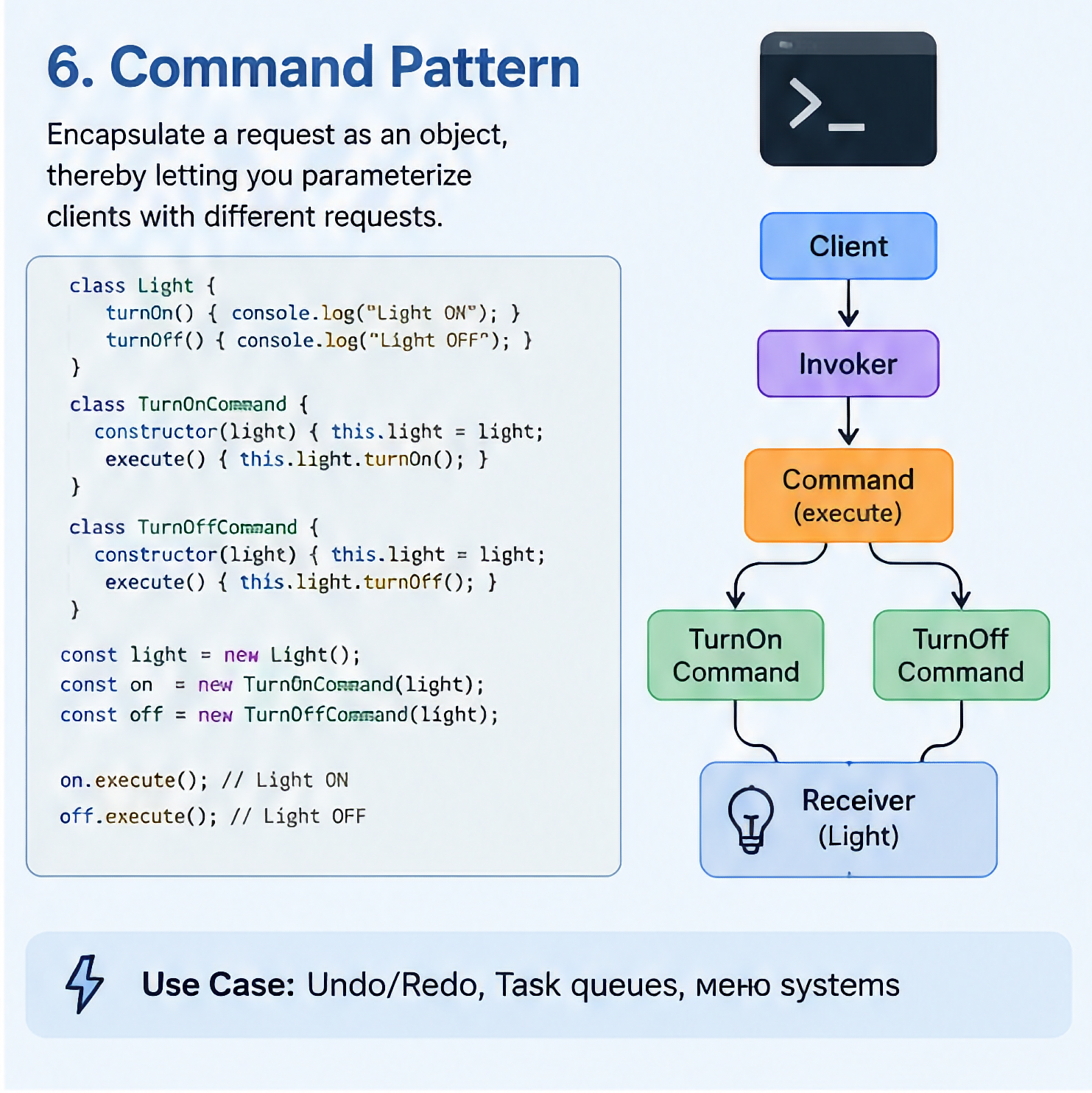
Yes, arguably even more visibly. Express and Koa middleware chains are a direct, everyday example of the Decorator pattern — each middleware function wraps the request-handling behavior without altering the original handler. Database connection pools are commonly implemented as Singletons to avoid creating a new connection for every request. Command-style patterns show up in job queues and task runners. Backend JavaScript tends to make these patterns more explicit because the problems — shared state, request pipelines, task scheduling — are structural by nature.
10. How long does it take to genuinely understand design patterns, not just memorize their names?+
Recognizing pattern names and rough definitions can happen in a single afternoon of focused reading. Genuine fluency — being able to spot a pattern in unfamiliar code, apply one deliberately to a real problem, and explain the decision clearly under interview pressure — typically takes a week or two of active practice on real code, not passive reading. The fastest path is the one outlined in this guide's roadmap: find a pattern already hiding in something you've built, refactor deliberately, and explain the change out loud at least once before moving on to a new pattern.
Ready to Practice What You Learned?
Take a free AI mock interview and get your skill score in 15 minutes. 100% free for all candidates.
Tags:Fresher Jobs 2026Entry Level JobsJobs for FreshersCampus RecruitmentOff Campus JobsJob Vacancies for FreshersGraduate JobsTrainee JobsIT Jobs for FreshersSoftware Engineer FresherCareer After GraduationHow to Get First JobFresher Resume FormatJob Interview Tips for FreshersWalk-in InterviewsGovernment Jobs for FreshersPrivate Jobs for FreshersJob Portals IndiaNaukri for FreshersLinkedIn for Job SearchCareer Switch for FreshersSalary for Freshers in IndiaAptitude Test PreparationGroup Discussion TipsTechnical Interview QuestionsFresher Placement PreparationBest Companies for FreshersJob Alerts for FreshersWork From Home Jobs FresherInternship Opportunities 2026